
Your heart deserves more than a number.
CardiLog is the AI blood pressure companion your doctor wishes you had. Log readings in seconds, catch dangerous trends early, calm your pressure with guided breathing, and share a clinical-grade PDF with your doctor.

- 5 international BP guidelines
- 100% on-device, no account
- Works with any monitor
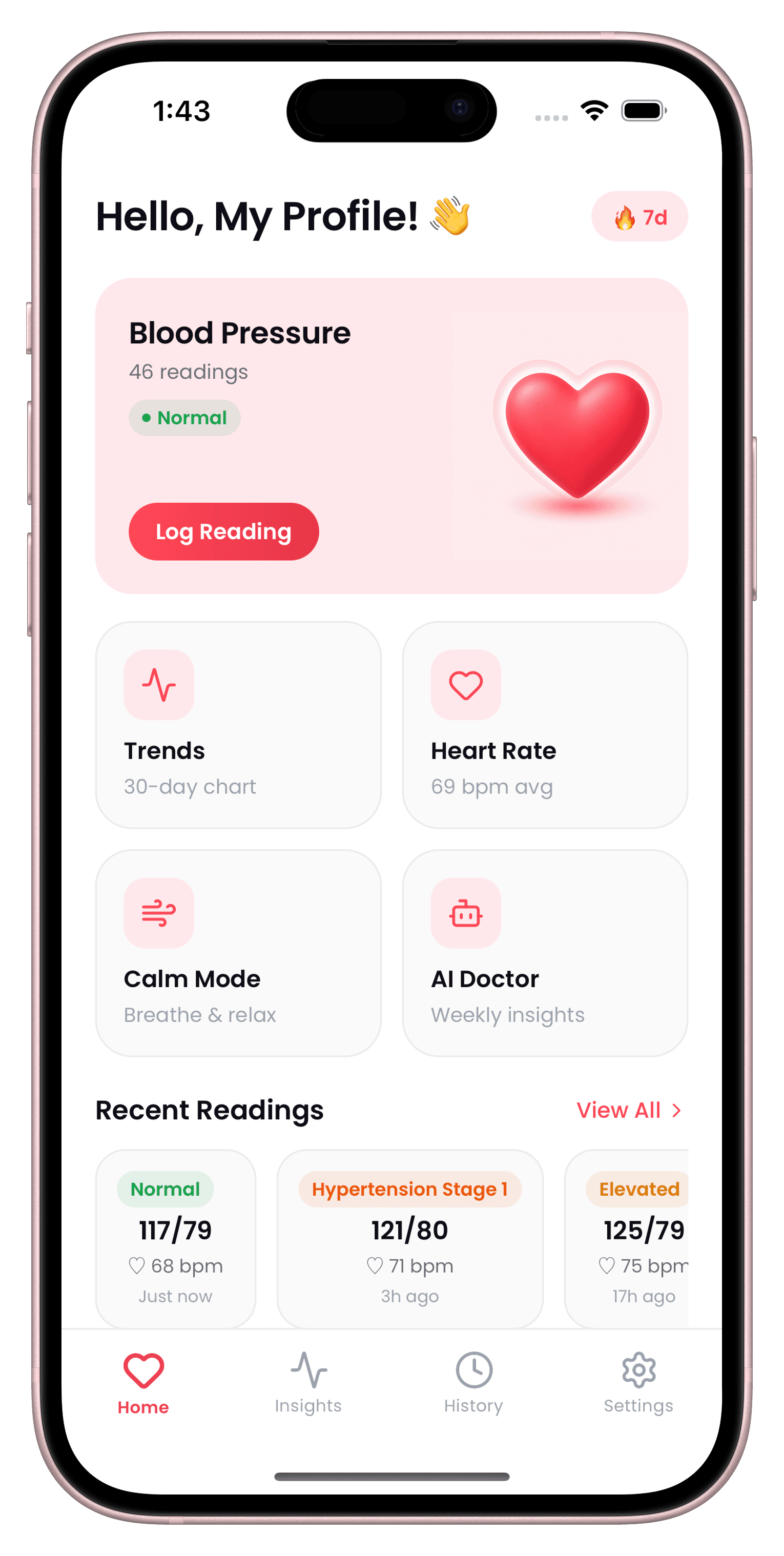
Log in seconds
Enter systolic, diastolic, and pulse from any monitor and see your stage classified instantly on your home screen.
- Works with any monitor — no Bluetooth pairing required
- Automatic stage classification on every entry
- Quick links to Trends, Heart Rate, Calm Mode, and tests
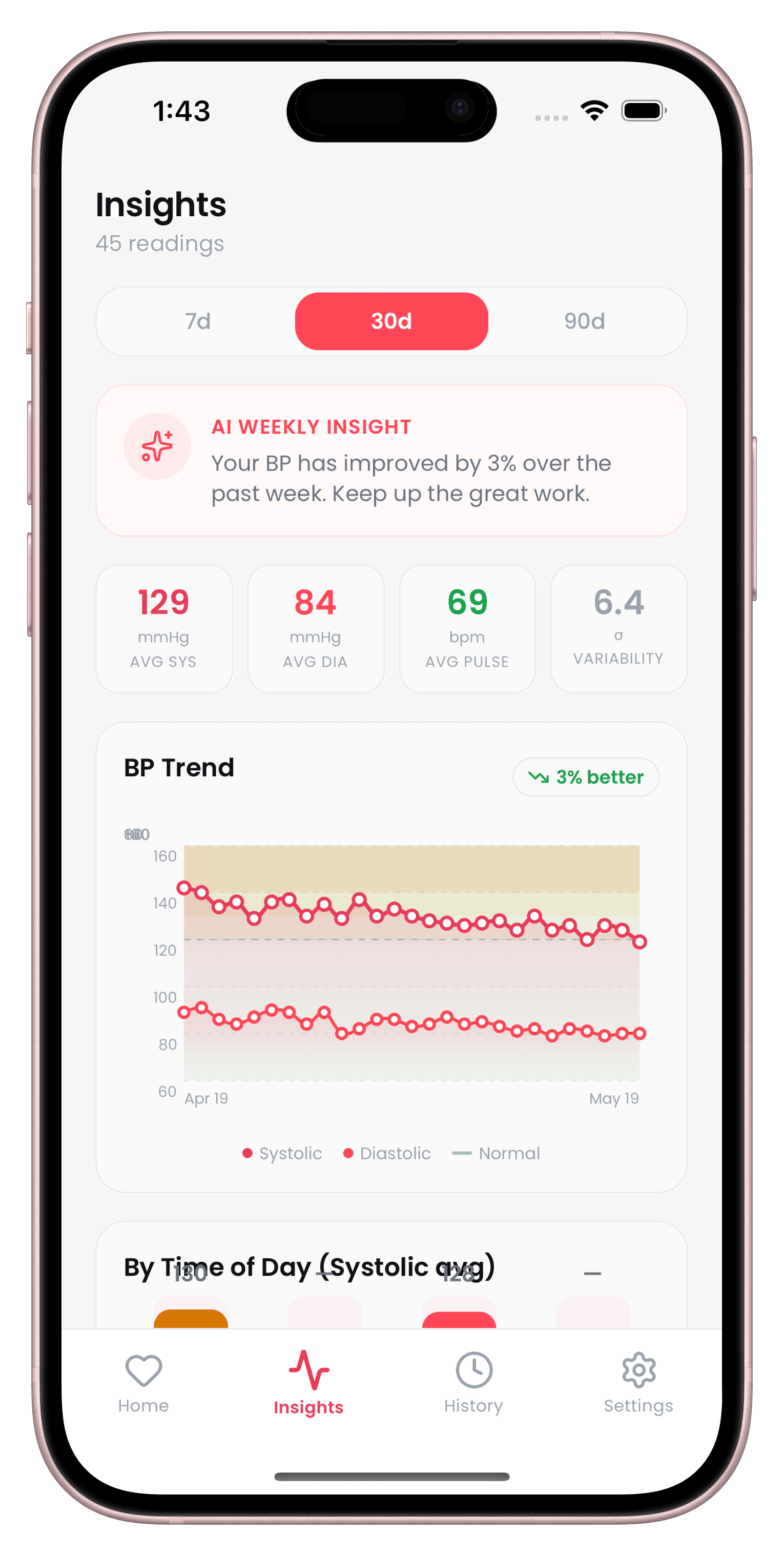
See the trend, not just the number
Weekly AI insights, a 30-day BP trend chart, and time-of-day breakdowns show you the pattern behind every reading.
- Weekly AI insight surfaces patterns automatically
- 7, 30, and 90-day trend chart with a normal range band
- Time-of-day breakdown to catch morning surges
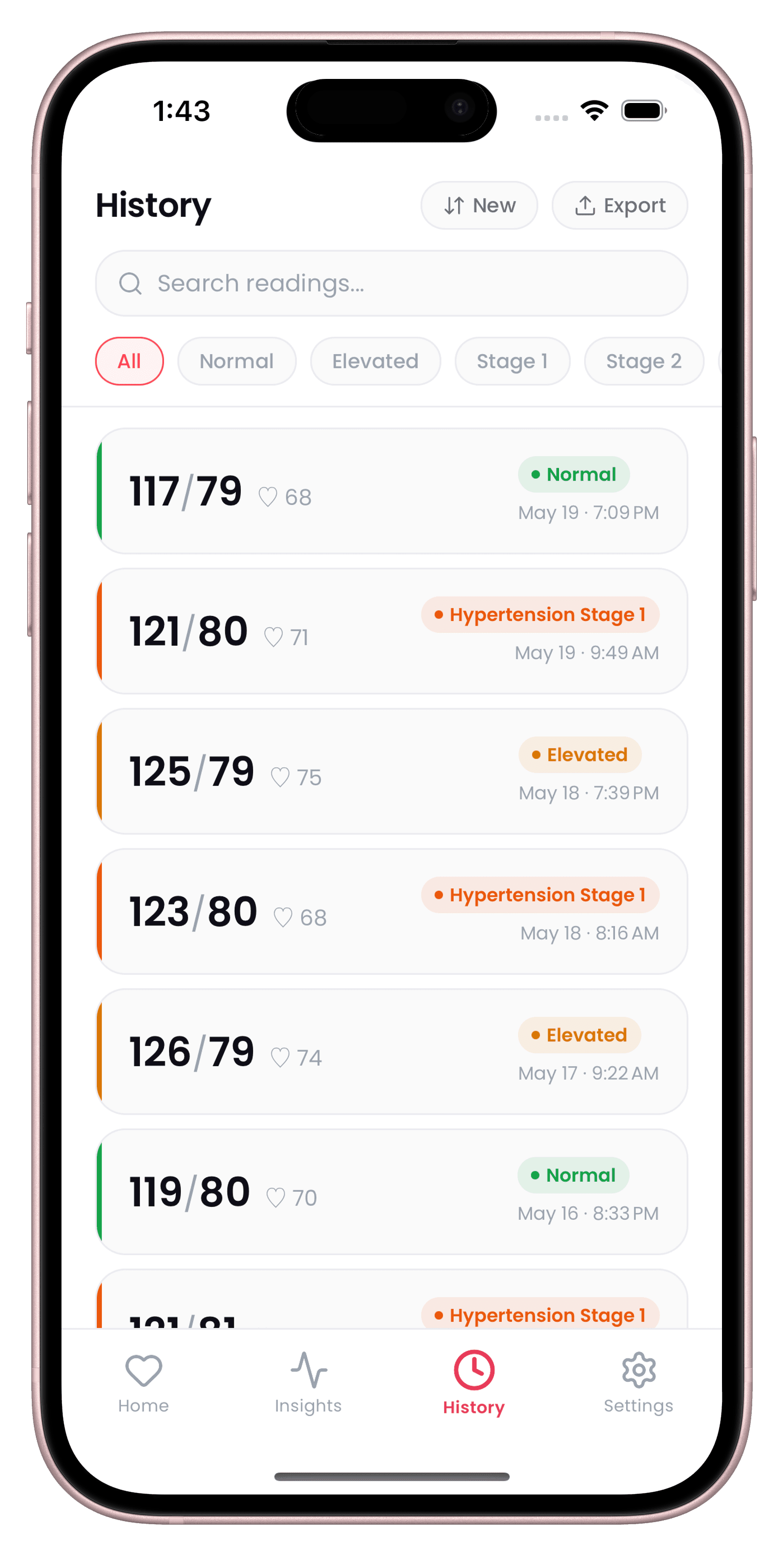
A full history you can search
Every reading, filterable by stage and searchable by date — ready to review before your next appointment.
- Search and filter your full history by stage or date
- Color-coded stage badges at a glance
- Export your history as a doctor-ready PDF
5 international BP guidelines
Choose the clinical guideline your doctor uses and every reading is classified automatically, from Normal through Hypertensive Crisis.
Privacy-first, always
All readings are stored locally on your device. No account, no cloud sync — no server ever sees your data.
Calm Mode breathing
An evidence-based 4-4-6 protocol, based on published slow-paced breathing research shown to help lower systolic BP before you take a reading.
Up to 5 family profiles
Track your own readings alongside a parent's or partner's, each with independent history and settings.
Doctor-ready PDF export
Generate a clinical-style report with your full history, averages, and trend analysis in seconds.
Works with any monitor
Omron, Kardia, Withings, iHealth, A&D, or a manual cuff — no Bluetooth pairing required.
What early testers are saying
“Logging a reading takes ten seconds now instead of digging through a paper notebook.”
“The breathing exercise before I measure actually helps me get a calmer, steadier number.”
“I finally have one place to track blood pressure for both me and my dad.”
“The weekly trend chart made it obvious my mornings were the problem — I never would have noticed on my own.”
“Being able to search my history by date before an appointment saves me so much time.”
“I exported a PDF for my cardiologist and she said it was the clearest summary a patient had ever brought her.”
“Switching between my profile and my mom's takes one tap. No more mixing up whose numbers are whose.”
“The larger text and simple layout make this the first health app my grandfather has stuck with.”
“Tagging readings with exercise and sleep helped me see exactly what was pushing my numbers up.”
“Everything stays on my phone. No account to set up was the reason I actually tried it.”
“The heart age test is a fun way to check in between full readings — my kids like trying it too.”
“My daily streak keeps me consistent in a way reminders alone never did.”
“I switched the guideline setting to match what my doctor uses and the staging finally matched her notes.”
“Logging a reading takes ten seconds now instead of digging through a paper notebook.”
“The breathing exercise before I measure actually helps me get a calmer, steadier number.”
“I finally have one place to track blood pressure for both me and my dad.”
“The weekly trend chart made it obvious my mornings were the problem — I never would have noticed on my own.”
“Being able to search my history by date before an appointment saves me so much time.”
“I exported a PDF for my cardiologist and she said it was the clearest summary a patient had ever brought her.”
“Switching between my profile and my mom's takes one tap. No more mixing up whose numbers are whose.”
“The larger text and simple layout make this the first health app my grandfather has stuck with.”
“Tagging readings with exercise and sleep helped me see exactly what was pushing my numbers up.”
“Everything stays on my phone. No account to set up was the reason I actually tried it.”
“The heart age test is a fun way to check in between full readings — my kids like trying it too.”
“My daily streak keeps me consistent in a way reminders alone never did.”
“I switched the guideline setting to match what my doctor uses and the staging finally matched her notes.”
Frequently asked questions
Getting Started
What is CardiLog?
CardiLog is an AI-powered blood pressure companion app. It lets you log systolic, diastolic, and pulse readings in seconds, spot dangerous trends before they escalate, calm your pressure with guided breathing, and share a clinical-style report with your doctor — all without needing a dedicated Bluetooth device.
Is CardiLog a medical device?
No. CardiLog is not a medical device and is not intended to diagnose, treat, cure, or prevent any disease or health condition. It's a logging and pattern-recognition tool — always consult a qualified physician before making medical decisions, and call emergency services in an emergency.
Do I need to create an account to use CardiLog?
No. There's no sign-up, no email, and no password. You open the app and start logging — everything is tied to your device, not an account.
Does CardiLog work without an internet connection?
Yes. Logging, insights, Calm Mode, and your history all run locally on your device, so CardiLog works fully offline — you don't need Wi-Fi or cellular data to use it.
Is CardiLog available on Android?
CardiLog is currently built and published for iPhone. There's no Android release yet.
Does CardiLog work with my blood pressure monitor?
Yes. CardiLog accepts manual entry from any monitor — Omron, Kardia, Withings, iHealth, A&D, or a standard cuff. No Bluetooth pairing is required; just read the numbers off your device and log them in seconds.
Logging & Tracking
How do I log a blood pressure reading?
Open CardiLog, tap Log Reading, and enter your systolic, diastolic, and pulse numbers from any monitor. CardiLog instantly classifies the reading's stage and adds it to your history.
What are Mean Arterial Pressure (MAP) and Pulse Pressure?
They're two extra metrics CardiLog calculates automatically from every reading — Mean Arterial Pressure (average pressure in your arteries during one heartbeat cycle) and Pulse Pressure (the gap between your systolic and diastolic numbers) — both useful context alongside the raw numbers.
Can I tag readings with context like exercise or medication?
Yes. You can tag a reading with context such as exercise, meals, medication, stress, poor sleep, or caffeine, which makes it easier to see what's actually influencing your numbers over time.
Can I record where a reading was taken?
Yes. You can label a reading's location — Home, Clinic, Pharmacy, or Travel — which is especially useful for comparing home readings against clinic readings.
What blood pressure guidelines does CardiLog support?
CardiLog supports 5 international guidelines — AHA, ESC, JNC8, WHO, and NICE — and automatically classifies each reading from Normal through Hypertensive Crisis based on the guideline you choose.
What happens if a reading is dangerously high?
If a reading crosses into Hypertensive Crisis territory, CardiLog shows an alert with step-by-step guidance on what to do next. This is informational only — CardiLog is not a substitute for emergency care, so call your local emergency services immediately if you believe you're having a medical emergency.
AI Insights & Heart Tests
How does CardiLog's AI trend detection work?
Each week, CardiLog analyzes your recent history — not just your latest reading — to surface patterns like rising trends, unusual variability, or time-of-day spikes that are easy to miss when you only look at one number at a time.
What are Morning Surge and White Coat Effect detection?
Morning Surge detection flags dangerous early-morning BP spikes, a known risk factor for stroke and heart attack. White Coat Effect detection flags when your clinic readings consistently run higher than your home baseline, so you get a more accurate picture of your real numbers.
What is the Heart Age test?
It's a quick, camera-based test — you place your finger over your phone's camera and flash, and CardiLog estimates a heart age based on your pulse signal in about 30 seconds. It's a fun, fast check-in between full BP readings, not a diagnostic measurement.
What other heart tests are included?
Beyond the Heart Age test, CardiLog includes a Heart Risk Test, a Stress Check, a Sleep Quality Test, and a Salt & Diet Check — short, guided check-ins that add more context to your overall picture.
Calm Mode
Does the breathing exercise in Calm Mode actually help?
Calm Mode uses an evidence-based 4-4-6 breathing protocol, based on published slow-paced breathing research showing it can activate the parasympathetic nervous system and help lower systolic blood pressure before a reading.
What breathing protocols does Calm Mode offer?
You can choose from four guided protocols — Calm (4-4-6), 4-7-8, Box breathing (4-4-4-4), and Coherent breathing (5-5) — each with an animation that paces your inhale, hold, and exhale.
Family, Sharing & Apple Health
Can I track blood pressure for my whole family?
Yes. CardiLog supports up to 5 family profiles, each with independent history and its own guideline selection — switch between them instantly.
Can I export or share my readings with my doctor?
Yes. CardiLog can generate a clinical-style PDF report with your full history, averages, and trend analysis, or export your raw data as a CSV. Share either one directly by email, AirDrop, or Messages.
Does CardiLog connect with Apple Health?
Yes. CardiLog can read your heart rate and weight from Apple Health to enrich your insights, and can save your blood pressure and heart rate readings back to Apple Health — all processed on your device.
Can CardiLog remind me to log a reading?
Yes. You can set a daily reminder notification at whatever time works best for you, so logging becomes a habit instead of something you have to remember on your own.
Privacy & Data
Is my blood pressure data private?
All readings are stored locally on your device using on-device storage. There's no account, no cloud sync, and no server that ever sees your data.
What happens to my data if I switch phones or lose my device?
Because CardiLog has no account or cloud sync, your readings live only in your phone's local storage — which means they're included in your regular iPhone backup (iCloud or computer backup) like any other app data, but there's no separate CardiLog recovery option. Exporting a PDF or CSV before switching devices is a good extra safety net.
Accessibility & Pricing
Is CardiLog easy to use for older adults?
Yes. CardiLog includes a Senior Mode with larger text and simplified navigation, plus haptic feedback throughout for a more accessible, tactile experience.
Is CardiLog free to use?
Yes. Core features — logging, AI trend insights, Calm Mode, and heart tests — are free forever.
What does CardiLog Pro include?
CardiLog Pro unlocks unlimited PDF export and one-tap doctor sharing, extended 90-day AI insight analysis, and priority support. Pricing and subscription terms are available on the App Store listing, and any subscription can be managed or cancelled from your Apple ID Account Settings.
Start tracking today.
Your doctor checks your BP twice a year. CardiLog watches it every day.
Free to start · No account required